Local Components
Form Lab operates entirely on your local workstation using Docker Compose, creating a self-contained cluster of services that work together. This approach eliminates the need for cloud resources or complex server setups during development.
Docker Compose and Container Orchestration
Docker Compose is a tool that defines and runs multi-container Docker applications. It uses a YAML file (docker-compose.yml) to configure all the application's services, creating a virtual network where these containers can communicate with each other. This setup provides:
- Isolated networking between services
- Consistent environment across different machines
- Simple startup and shutdown of all services
- Automatic container orchestration
Container Sources
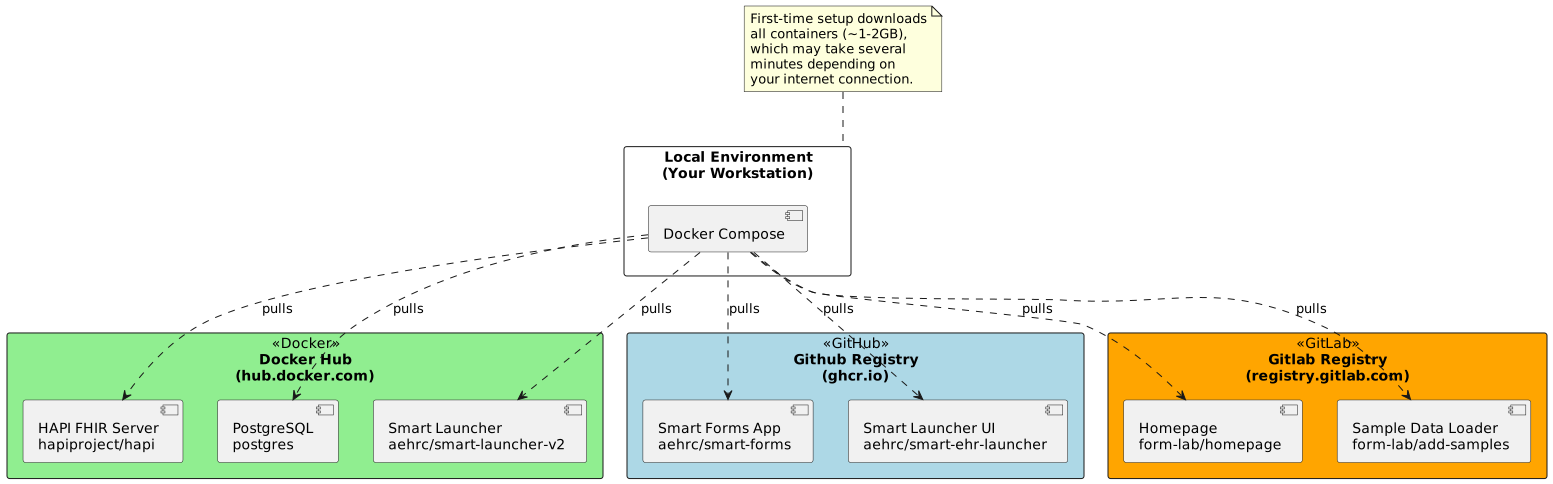
Form Lab pulls pre-built containers from various registries. Here's how the components are sourced:
Services Overview
SMART EHR Launcher UI (smart-launcher-ui)
- Image:
ghcr.io/aehrc/smart-ehr-launcher/smart-launcher-v2 - Port: 81
- Purpose: Provides the web interface for launching SMART applications
- Dependencies: smart-launcher, smart-forms-app
- Configuration: Uses ehr-config.json for application settings
Sample Data Loader (add-samples)
- Image:
registry.gitlab.com/australian-e-health-research-centre/form-lab/add-samples - Purpose: Loads sample CDR and form definitions into the FHIR server
- Dependencies: fhir server
FHIR Server (fhir)
- Image:
hapiproject/hapi - Port: 8080
- Purpose: HAPI FHIR server for storing and managing healthcare data
- Configuration: Uses hapi.application.yaml
- Dependencies: PostgreSQL database
PostgreSQL Database (db)
- Image:
postgres - Port: 5432 (internal)
- Purpose: Persistent storage for HAPI FHIR server
- Environment Variables:
- POSTGRES_PASSWORD: admin
- POSTGRES_USER: admin
- POSTGRES_DB: hapi
- Persistence: Uses volume mount for data persistence
SMART Launcher Proxy (smart-launcher)
- Image:
aehrc/smart-launcher-v2 - Port: 8081
- Purpose: Handles SMART authentication and proxying to FHIR server
- Environment: Points to internal FHIR server
- Dependencies: fhir server
SMART Forms Application (smart-forms-app)
- Image:
ghcr.io/aehrc/smart-forms/smart-forms - Port: 82
- Purpose: Web application for managing and filling SDC forms
- Dependencies: fhir server
Documentation Homepage (home-page)
- Image:
registry.gitlab.com/australian-e-health-research-centre/form-lab/homepage - Port: 80
- Purpose: Serves project documentation
- Dependencies: smart-launcher-ui
Configuration Files
hapi.application.yaml
- HAPI FHIR server configuration
- Located in project root
- Mounted to:
/app/config/application.yaml
ehr-config.json
- SMART EHR Launcher configuration
- Located in project root
- Mounted to:
/usr/share/nginx/html/config.json
Network Architecture
Client Browser
     ↓
[80] Homepage
     ↓
[81] SMART EHR Launcher UI ←→ [8081] SMART Launcher Proxy
                                        ↓
[82] SMART Forms App    →    [8080] FHIR Server → [5432] PostgreSQL
Initial Setup
When you first run Form Lab, Docker Compose will download all required containers from their respective registries. This involves:
- HAPI FHIR Server, PostgreSQL, and Smart Launcher from Docker Hub
- Smart Forms and Launcher UI from GitHub Packages
- Homepage and Sample Data from GitLab Registry
The initial download may take several minutes depending on your internet connection, as it needs to fetch approximately 1-2GB of container images. However, subsequent starts are much faster as the images are cached locally.
Once downloaded, Docker Compose creates a virtual network where these services can communicate with each other, making the entire system appear as if it's running on a single machine. This approach provides a production-like environment while maintaining the simplicity of local development.