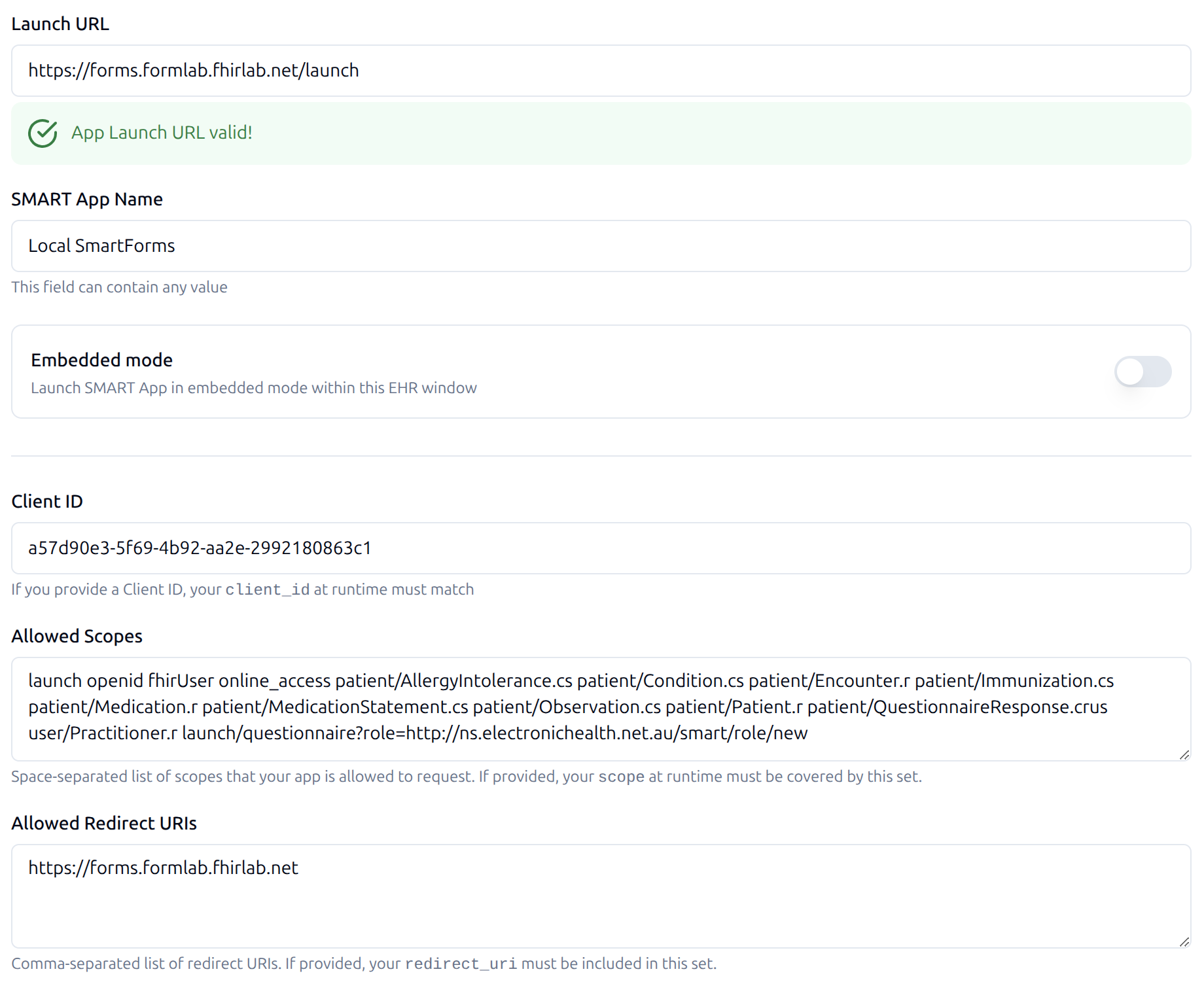
SMART-on-FHIR enables apps to securely integrate with EHR systems using OAuth 2.0 and a launch context schema. The screenshot shows the Form-Lab EMR simulator configuration, including:
- Launch URL:
https://forms.formlab.fhirlab.net/launch - SMART App Name:
Local SmartForms - Client ID:
a57d90e3-5f69-4b92-aa2e-2992180863c1 - Allowed Scopes: includes
launch,openid,fhirUser,launch/patient, and patient-scoped resource read scopes - Allowed Redirect URIs:
https://forms.formlab.fhirlab.net
Section 1: OAuth and the Problem It Solves
Healthcare apps need secure, delegated access to sensitive clinical data without exposing user credentials. OAuth 2.0 addresses this by issuing short-lived access tokens keyed to scopes that define what the app is permitted to do.
In the screenshot:
- The Client ID identifies the app to the authorization server.
- Allowed Redirect URIs constrain where authorization codes and tokens are sent.
- Allowed Scopes (e.g.,
launch,openid,fhirUser, and patient-scoped resource reads) define permission boundaries during the handshake.
Standard OAuth flow (high level):
- App sends an authorization request with client_id, scope, and redirect_uri.
- User authenticates and consents.
- Authorization server returns an authorization code to the redirect_uri.
- App exchanges the code for access (and optionally refresh) tokens.
- App calls the FHIR server using the access token.
Section 2: SMART-on-FHIR Launch Context
SMART-on-FHIR builds on OAuth by adding a launch context (e.g., patient, encounter, user), enabling the app to start with clinical awareness. The Launch URL in the screenshot (…/launch) is the app’s entry point, and SMART scopes like launch and launch/patient signal that the app expects EHR-provided context.
Typical SMART launch steps:
- EHR initiates launch to the Launch URL, passing a
launchparameter and the FHIR server base URL. - App initiates OAuth using client_id, scope, and redirect_uri.
- After token exchange, the app uses the launch context to resolve patient/encounter.
- The app subsequently interacts directly with the FHIR server.
There is a very good diagram and detailed explanation of the SMART-on-FHIR launch process in the SMART App Launch specification.
Special Case: Form-Lab Simulation
In Form-Lab, the OAuth authorization process is simulated. The EMR simulator’s UI lets you select User, Patient, Encounter, Role, etc. These selections mimic SMART launch context—no real auth server redirects or token exchanges are performed.
Important: The simulated EHR’s only real purpose is to generate the launch link (using the configured Launch URL, Client ID, Scopes, and Redirect URI). After launch, all communication is between the app and the FHIR servers that provide the data. The EHR simulator does not participate beyond initial launch.
References
- OAuth 2.0 (RFC 6749) — The authorization framework underpinning delegated access:\ https://datatracker.ietf.org/doc/html/rfc6749
- SMART App Launch — HL7 SMART-on-FHIR specification detailing launch, scopes, and context:\ https://hl7.org/fhir/smart-app-launch/